
Get in touch with us today and our team of imaging professionals will be pleased to assist you.
Select a Network Interface Card
Select a network interface card (NIC) that supports the planned camera connections, data rate, network architecture, application requirements, and host-computer configuration.
For supported models and specifications, see Network Interface Card Reference.
Identify camera and application requirements
Record the following information before selecting a NIC:
- Camera model and quantity
- Required link speed and connector type for each camera
- Number of Ethernet connections required by each camera
- Planned resolution, pixel format, and frame rate
- Required application capabilities, such as PTP synchronization, RDMA, NVIDIA GPUDirect, or multi-server streaming
- Operating system and acquisition software
Use the applicable camera documentation and Data Interfaces to identify the supported link speed, connector type, and expected data rate.
Determine the network architecture
Determine how cameras will connect to the host computer.
A direct camera-to-host connection can be suitable for a small system. Each camera connection requires one compatible NIC port. A camera that uses multiple Ethernet connections requires one compatible port for each connection.
Example: Direct camera connections
A system with two cameras that each use one 25 GigE connection requires two compatible 25 GigE NIC ports.
For scalability, manageability, and future expansion, use a switch-based network architecture. Confirm that the proposed switch, uplink connection, compatible optical components, and total network bandwidth support the planned camera configuration. The host NIC must provide the required uplink speed and port configuration; it does not necessarily require one port for each camera.
An optical transceiver or active optical cable between a NIC and a switch may require encoding that is compatible with the switch. An optical component used for a camera connection does not require switch-specific encoding.
Multicast is a special switched-network configuration that makes one camera stream available to multiple servers. The camera, publishing server, and target servers must connect to the same multicast-enabled switch. Multicast uses Emergent’s zero-copy GVSP implementation instead of RDMA. For this use case, it provides performance equivalent to RDMA, so the participating NICs do not require RDMA support. Confirm that the switch and each server’s NIC connection support the required stream bandwidth. For configuration instructions, see Stream a Camera to Multiple Servers with Multicast.
Confirm that the planned network architecture is supported before purchasing the NIC.
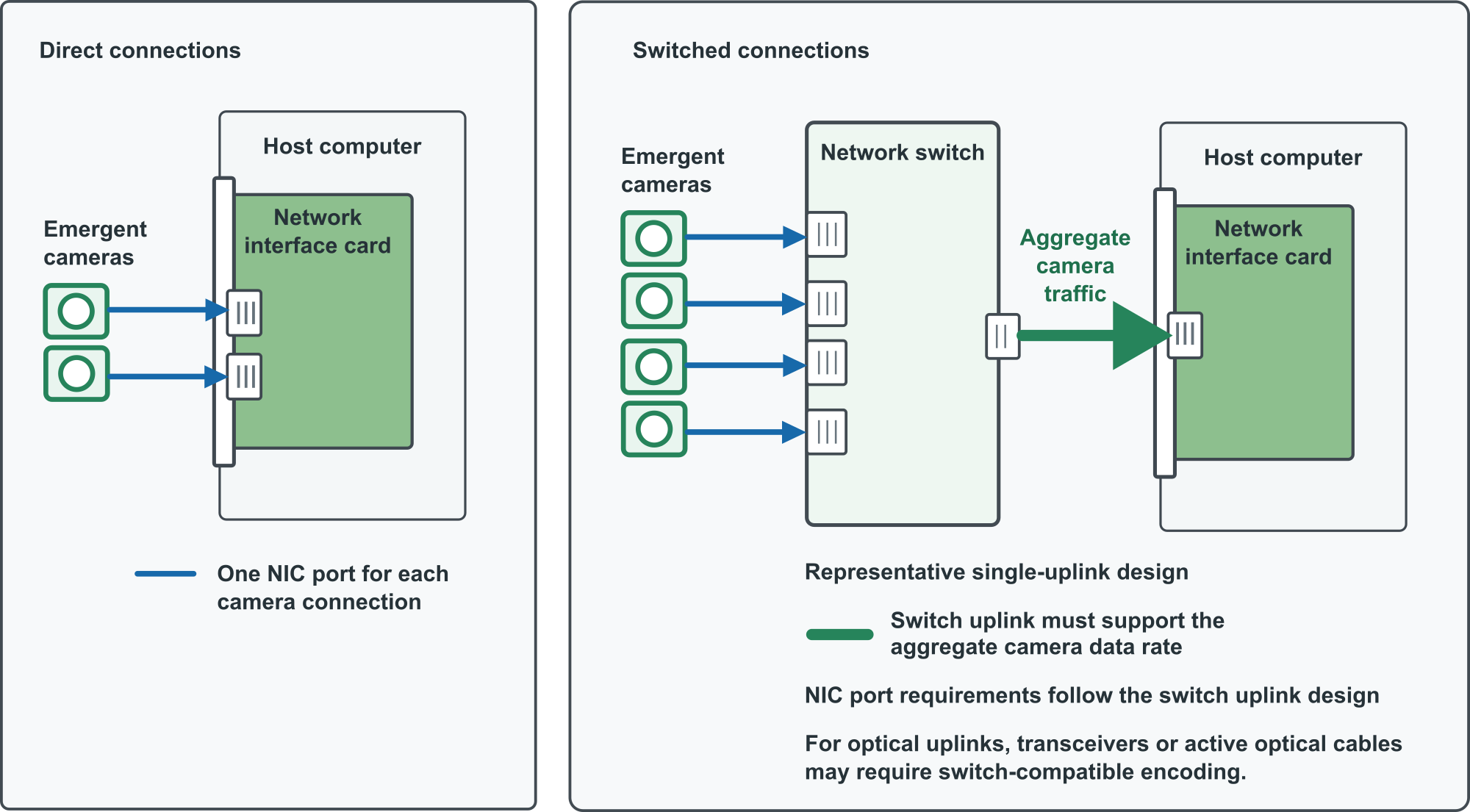
Figure 1: Direct camera connections and a representative switched network architecture
Confirm the required bandwidth
The NIC, PCIe connection, host computer, and network must support the total camera traffic, including protocol overhead.
Consider both of the following:
- Per-port bandwidth: Each NIC port must support the link speed required by its connected camera or switch uplink.
- Aggregate bandwidth: The NIC, PCIe connection, host computer, and any switch uplinks must support the combined data rate of all cameras that can stream at the same time.
Resolution, pixel format, pixel depth, frame rate, and camera count affect the required bandwidth. Do not size the NIC only for the link speed of one camera.
Example: Aggregate bandwidth
Four cameras transmitting up to 10 Gb/s each can produce up to 40 Gb/s of camera data before network-protocol overhead. Confirm that the NIC, PCIe connection, host computer, and any switch uplinks have sufficient capacity and headroom.
For more information about camera data rate, see the applicable camera documentation.
Confirm capability requirements
Some applications require capabilities beyond basic Ethernet connectivity. Select a NIC and host configuration that meet the requirements of the planned application.
Depending on the system, confirm requirements for:
- PTP synchronization
- RDMA
- NVIDIA GPUDirect
- Multi-server streaming
- A specific NIC driver or driver version
- A supported operating system
- A supported firmware version
- Features provided by a particular Emergent NIC
Support for an application capability can depend on the NIC model, driver, firmware, operating system, camera configuration, and acquisition software. Do not select a NIC based only on its connector type and advertised link speed.
Confirm host-computer compatibility
Before purchasing or installing a NIC, confirm that the host computer meets the requirements for the selected card.
Check the following:
- Required PCIe generation and lane width
- Available physical slot size
- Available electrical lane width
- NIC driver and firmware requirements
- Operating-system and acquisition-software compatibility
- Available card clearance, cooling, and power
A NIC can fit in a physically compatible PCIe slot but still have insufficient PCIe bandwidth for the planned camera data rate.
Refer to Network Interface Card Reference for model-specific host requirements.
Use System Designer to plan the configuration
Use Emergent Vision’s System Designer to plan the complete configuration before purchase or installation.
Enter the camera models, quantity, planned imaging settings, and host-computer details. Review the recommended NIC and any indicated port, bandwidth, PCIe, or compatibility limits.
System Designer supports planning. Confirm final product compatibility and availability against current Emergent documentation.
Confirm the complete configuration
Before purchasing a NIC, confirm that:
- Each camera connection has a compatible NIC port or network path.
- The NIC supports the required link speed and connector type for each connection.
- The NIC, PCIe connection, host computer, and network support the total camera data rate.
- Any switch, uplink, and optical connection support the aggregate traffic.
- The host computer meets the NIC’s PCIe, operating-system, clearance, cooling, and power requirements.
- The NIC and host configuration meet the requirements for all planned application capabilities.
- The NIC is listed in Network Interface Card Reference.
- The required NIC driver, firmware, and acquisition software are available for the planned system.
After selecting a NIC, see Install and Verify a Network Interface Card.
See also
Get in touch with us today and our team of imaging professionals will be pleased to assist you.