
Get in touch with us today and our team of imaging professionals will be pleased to assist you.
Network Cables and Optical Transceivers
Use this topic to compare network cables and optical transceivers from Emergent Vision Technologies for connecting a camera to a network interface card (NIC), switch, or other compatible network device.
The topic covers connection types, component identification, and product selection. It does not cover NIC or switch selection or installation procedures.
Before you choose a connection type
Before selecting a cable or transceiver, identify:
- The exact camera model and data interface
- Whether the camera connects directly to a NIC or through a switch
- The port type and supported Ethernet link rate at each endpoint
- The length of the complete cable route
- For a modular fiber link, the required fiber type, optical reach, and operating temperature
Use the current camera, NIC, and switch documentation to confirm these requirements.
Compare connection types
| Connection type | Use it when | Connection construction |
|---|---|---|
| CAT6A Ethernet cable | Both endpoints have compatible RJ45 ports. | Copper cable with RJ45 connectors. |
| Direct-attach copper (DAC) cable | Both endpoints have compatible SFP+, SFP28, or QSFP28 ports, and the cable length meets the route requirement. | Copper cable with permanently attached connectors. |
| Modular fiber link | You need to select the fiber-optic cable and transceivers separately. | Fiber-optic cable with a transceiver at each endpoint. |
| Active optical cable (AOC) | You need a fixed-end optical connection between compatible endpoints. Emergent Vision currently lists QSFP28 AOCs. | Fiber-optic cable with integrated active electronics at both ends. |
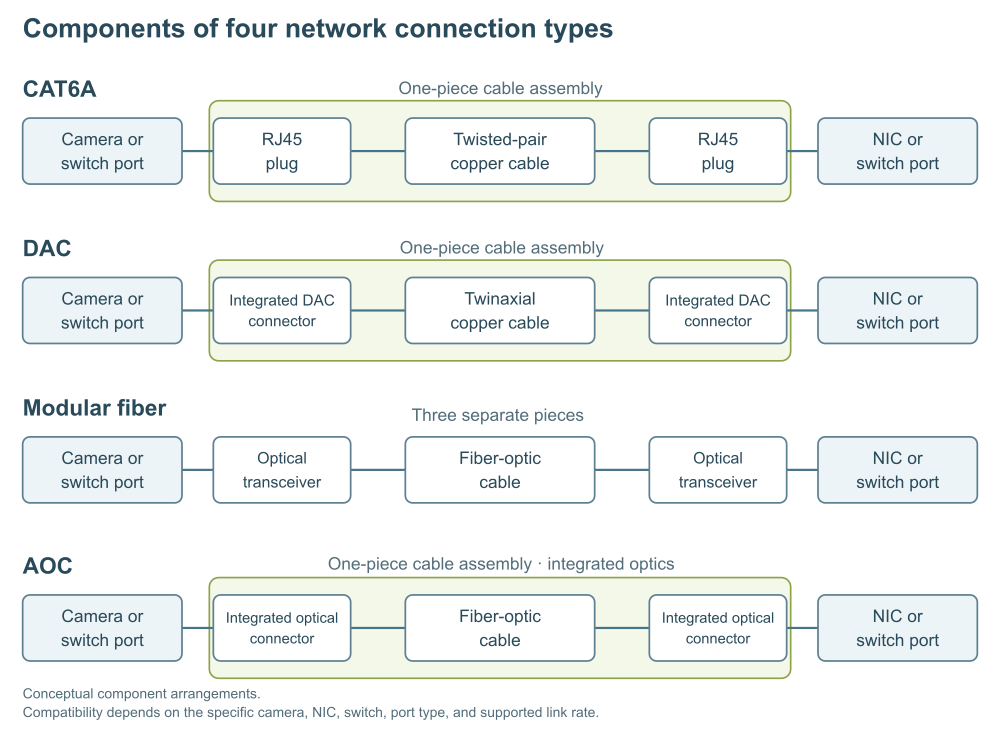
Figure 1: Components of four network connection types
A one-piece connection uses a single cable assembly with attached ends, such as a CAT6A cable, DAC, or AOC. A three-piece modular fiber connection uses one LC-LC fiber cable and a separate optical transceiver at each endpoint.
Choose a copper connection when the endpoint ports and cable length meet the system requirements. For an RJ45 connection, also confirm Power over Ethernet (PoE) support if required. Choose an optical connection when the cable route, electrical environment, or existing fiber infrastructure favors fiber. Use a modular fiber link rather than an AOC when you need to replace the cable and transceivers separately.
Copper connection types
CAT6A Ethernet cables
Emergent Vision’s CAT6A Ethernet cables provide shielded copper connections between compatible RJ45 ports and support 1GigE, 2.5GigE, 5GigE, and 10GigE link rates. Use a CAT6A cable when both endpoints have compatible RJ45 ports.
Emergent Vision offers 26 AWG CAT6A patch cables in lengths up to 100 ft (30.5 m). A separate 23 AWG S/FTP CAT6A cable range has been qualified for Eros camera connections at up to 10 Gbps and includes a 100 m cable assembly. Confirm availability of the required length with Emergent Vision.
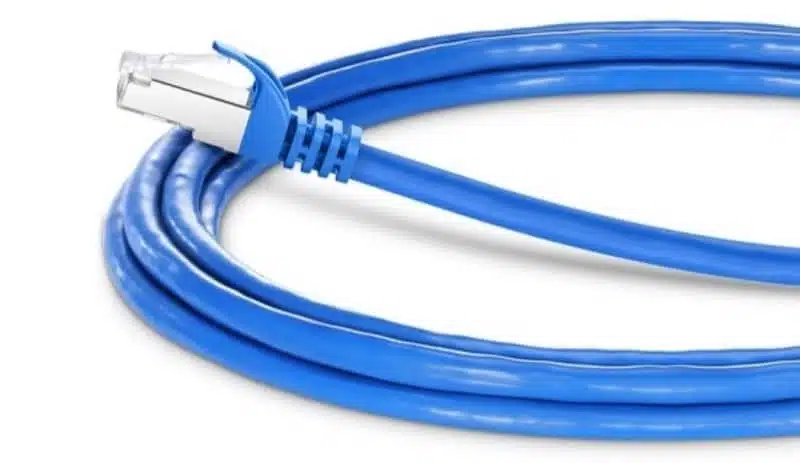
Figure 2: Example of a 26 AWG CAT6A patch cable
Understand CAT6A shielding
CAT6A cabling controls crosstalk between conductors and neighboring cables. In industrial installations, motors, drives, and nearby power wiring can also introduce electrical noise. Shielding can help manage interference, but CAT6A does not require shielding in every installation.
Shielding notation identifies the shields around the cable and its twisted pairs. In X/YTP, the first part identifies the overall cable shield, and the second identifies the shielding around the pairs. U means unshielded, F means foil, S means braid, and TP means twisted pair.
Figure 3 compares four constructions and highlights S/FTP: an overall braid with foil around each pair. Emergent Vision’s CAT6A product descriptions use SFTP to identify this S/FTP construction.
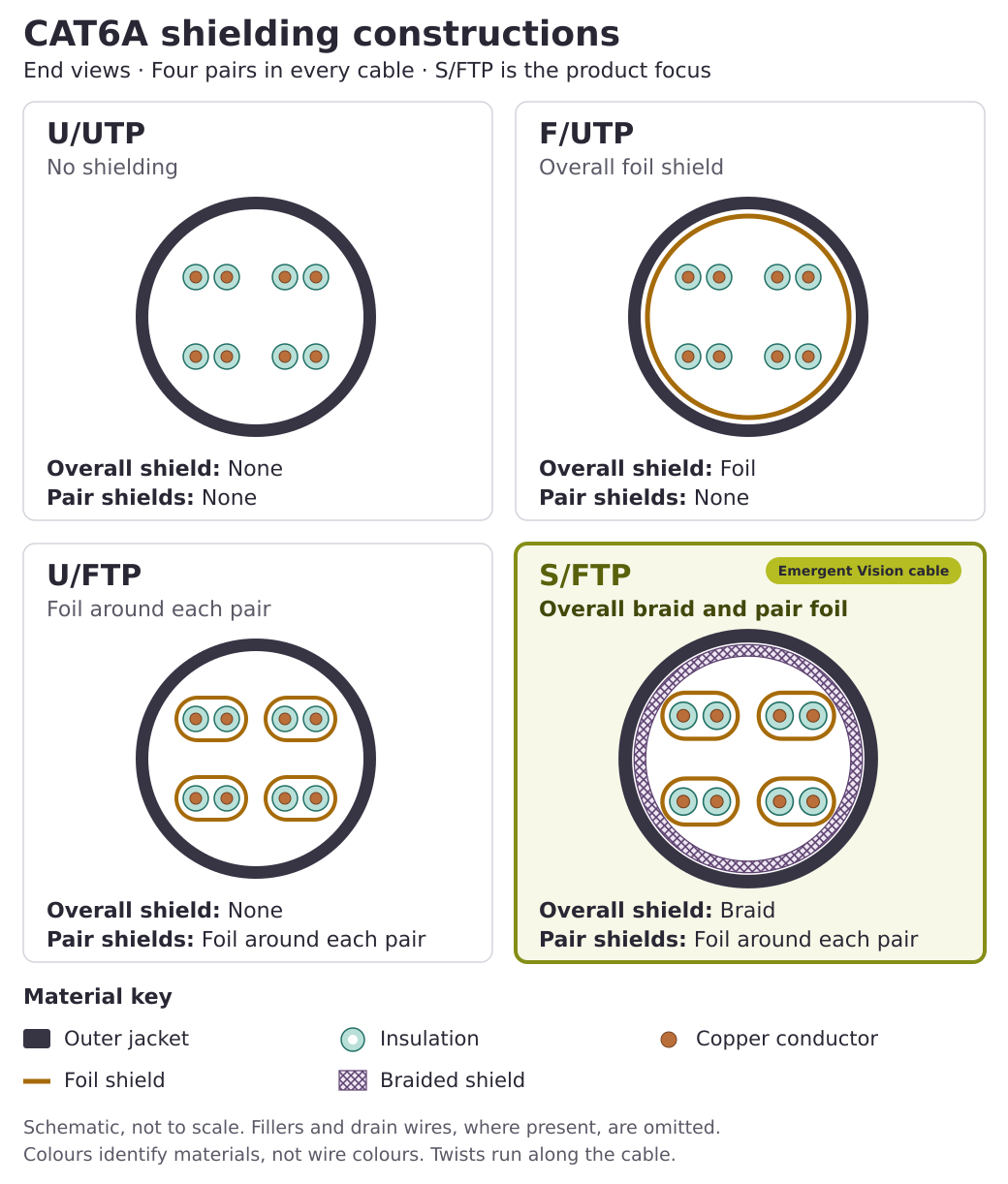
Figure 3: CAT6A shielding constructions. The highlighted S/FTP construction has an overall braid and foil around each twisted pair.
For a shielded connection, use compatible connectors and terminations that maintain shield continuity. Follow the equipment and site grounding requirements.
Direct-attach copper cables
A direct-attach copper (DAC) cable has connectors permanently attached at both ends. It plugs directly into compatible device ports and does not require separate transceivers.
Emergent Vision lists DAC cables for:
- 10GigE SFP+ connections
- 10GigE and 25GigE SFP28 connections
- 100GigE QSFP28 connections
Use a DAC cable when both endpoints support its connector type and link rate, and its length meets the cable route requirement.
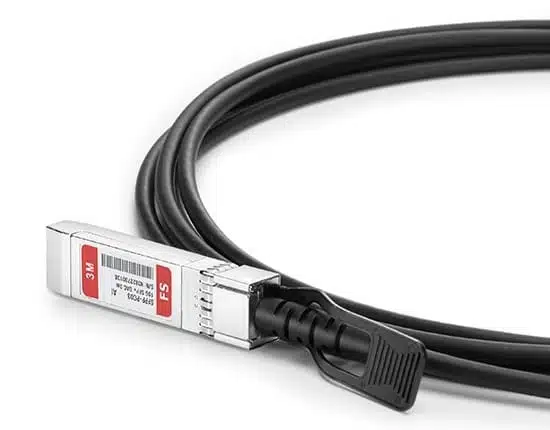
Figure 4: Direct-attach copper cable
Optical connection types
Modular fiber links
A modular fiber link uses a fiber-optic cable and a compatible optical transceiver at each endpoint. Each transceiver plugs into a camera, NIC, or switch port. The cable connects the LC ports on the two transceivers. LC (Lucent Connector) is a compact fiber-optic connector.
Use a modular fiber link when you need to select or replace the cable and transceivers separately.
Fiber-optic cables
Emergent Vision provides LC-LC fiber-optic cables in two types:
- Multimode fiber: OM3 50/125 fiber
- Single-mode fiber: 9/125 fiber
Choose a cable that matches the transceivers’ fiber type and is long enough for the complete cable route.
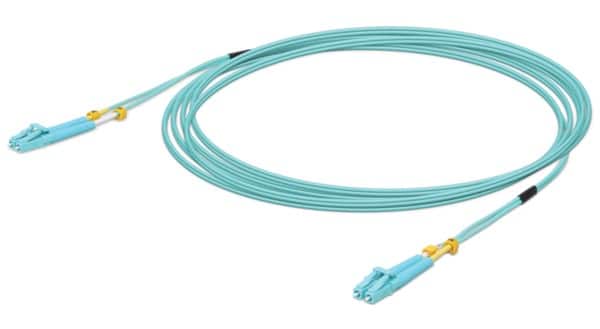
Figure 5: Multimode fiber-optic cable
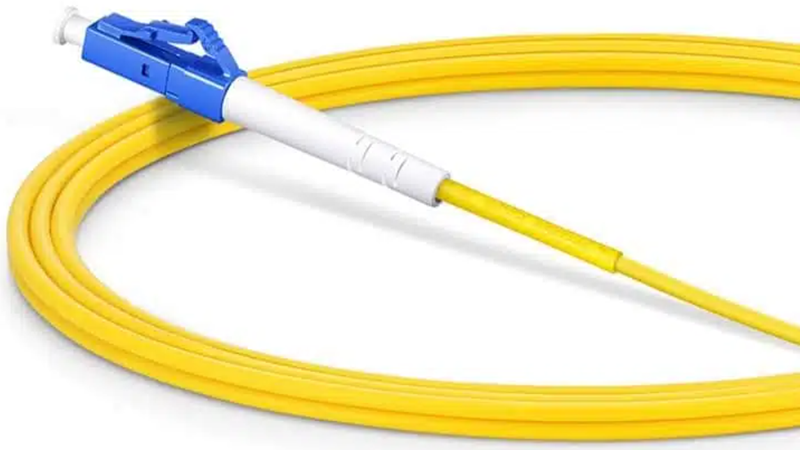
Figure 6: Single-mode fiber-optic cable
Emergent Vision’s 9/125 single-mode LC-LC cables have yellow jackets. Confirm the fiber type from the cable specifications, not color alone.
Optical transceivers
An optical transceiver converts electrical signals from a device port into optical signals for transmission over fiber. It converts received optical signals back into electrical signals.
Emergent Vision lists optical transceivers for:
- 10GigE SFP+ ports
- 25GigE SFP28 ports
- 100GigE QSFP28 ports
Select a transceiver that matches the device port and meets the requirements for link rate, fiber type, optical reach, and operating temperature.
Confirm that the two transceivers use compatible optical standards and that each endpoint device supports its transceiver. For switches, also check support for the transceiver’s encoding.
Optical reach is the maximum supported transmission distance for a transceiver and matching fiber combination. It is not the physical length of the installed fiber cable.
Single-fiber BiDi (bidirectional) transceivers use wavelength-division multiplexing (WDM) to transmit and receive on different wavelengths over one fiber strand. Emergent Vision does not currently stock BiDi transceivers.
Identify the transceiver family
Figure 7 shows representative SFP+, SFP28, QSFP28, and QSFP56 optical transceivers. These examples illustrate module families, not the current Emergent Vision product range.
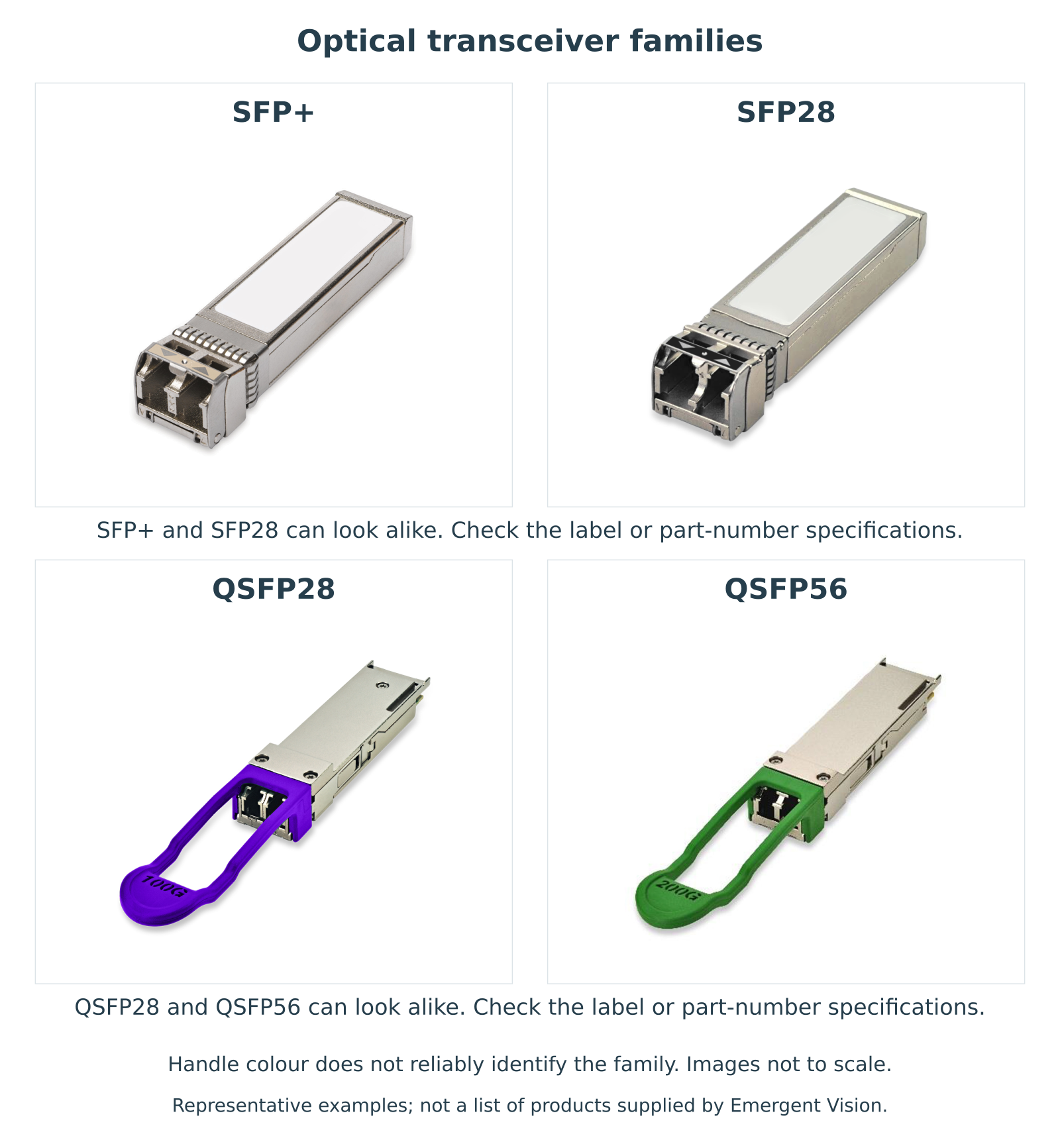
Figure 7: Representative optical transceiver families. Images are not to scale.
SFP+ and SFP28 modules can look alike, as can QSFP28 and QSFP56 modules. Housing shape and handle color do not reliably distinguish these pairs. Appearance alone does not establish compatibility.
QSFP-DD (quad small form-factor pluggable double density) uses eight high-speed electrical lanes, compared with four in QSFP28 and QSFP56. Its host-side electrical connector has an additional row of contacts. QSFP-DD modules can resemble other QSFP modules, so check the label and the manufacturer’s specifications for the exact part number. This description is for identification only and does not imply that Emergent Vision supplies or supports QSFP-DD products.
Read the transceiver label
Check the label for the module family, data rate, optical standard, optical wavelength, and manufacturer’s part number. If a specification is not printed on the label, look up the part number in the manufacturer’s documentation.
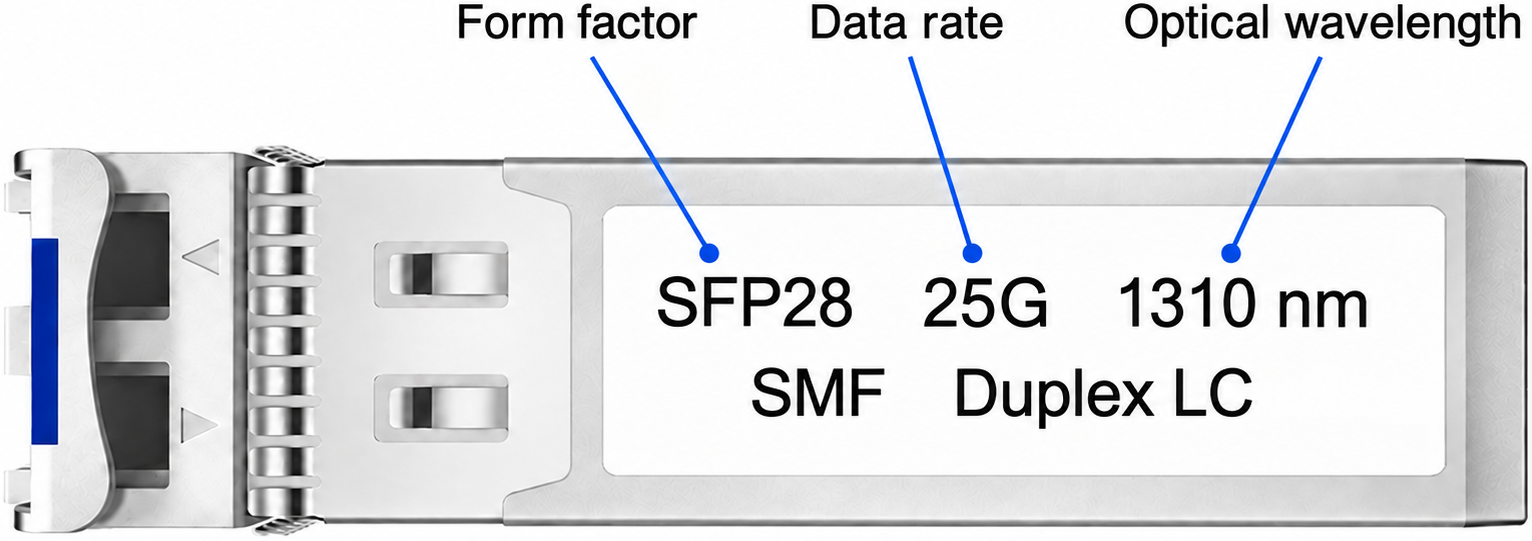
Figure 8: Illustrative transceiver label identifying the form factor, data rate, and optical wavelength. Actual label layouts and markings vary.
Data-rate markings such as 10G, 25G, 100G, and 200G indicate the module’s data rate. Wavelength markings such as 850 nm and 1310 nm indicate its optical operating wavelengths. These markings alone do not establish compatibility.
SMF means single-mode fiber. Duplex LC indicates a two-fiber connection with paired LC connectors.
Active optical cables
An active optical cable (AOC) is a fiber-optic cable with integrated active electronics at both ends. These electronics convert electrical signals to optical signals and back. An AOC does not require separate transceivers or a separate fiber patch cable.
Emergent Vision currently lists 100GigE QSFP28 AOCs.
Confirm that the AOC’s connector type, link rate, and cable length meet the system requirements.
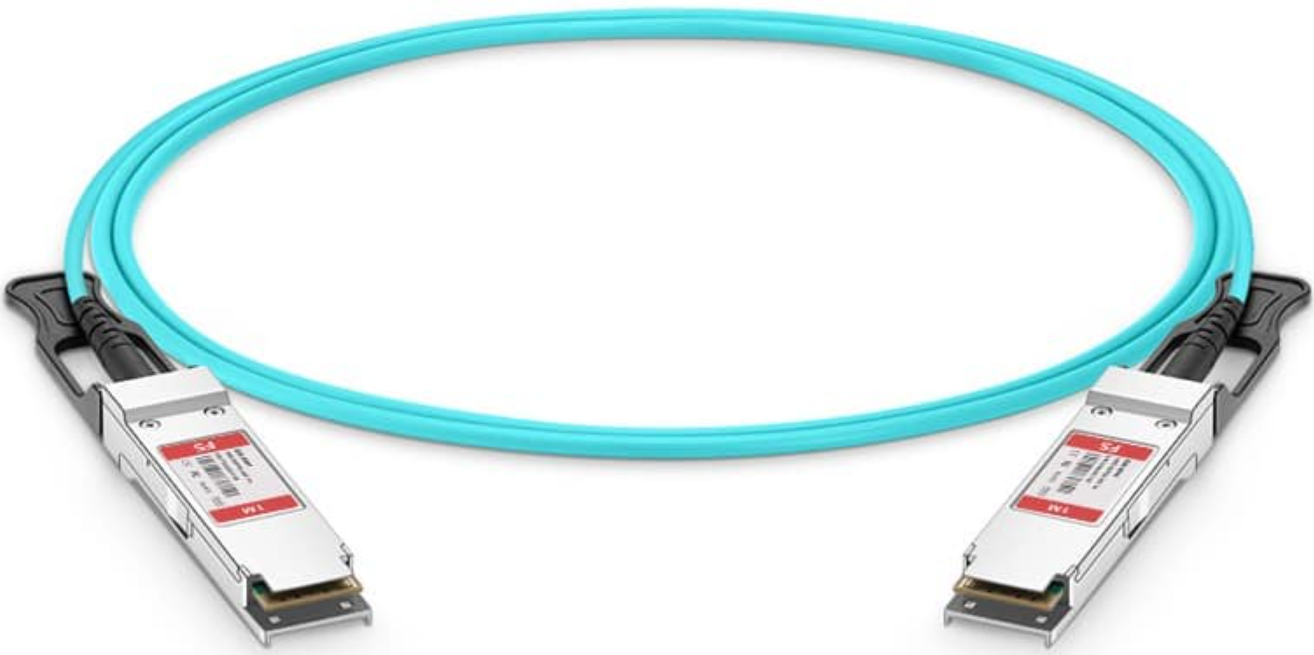
Figure 9: Active optical cable
Find products with the Cable Selector
Use the System Designer’s Cable Selector to find product candidates for the required port types, link rate, and cable route length. A result does not confirm current availability or compatibility with the complete system.
For a modular fiber link, select one LC-LC fiber-optic cable and a compatible optical transceiver for each endpoint.
- Open the System Designer and select Cable Selector.
- For Description, select the product category:
- Select Cable for a CAT6A cable, DAC cable, or fiber-optic cable.
- Select Transceiver for a pluggable optical transceiver.
- Select AOC for an active optical cable.
- For Medium and Type, select the values for your connection type:
- For CAT6A cables, select Copper and CAT6A.
- For DAC cables, select Copper and Direct Attach.
- For fiber-optic cables and optical transceivers, select Optical, then select Multi-Mode or Single-Mode.
- For AOCs, select Optical.
- For Connector, select the option for your cable or transceiver:
- Select RJ45 for a CAT6A cable.
- Select SFP+, SFP28, or QSFP28 for a DAC cable, as required by the endpoint ports.
- Select LC-LC for a fiber-optic cable.
- Select SFP+/LC, SFP28/LC, or QSFP28/LC for an optical transceiver.
- Select QSFP28 for an AOC.
- For Speed, select a link rate supported by both endpoint ports.
- Check Length for the product type:
- For DAC cables, fiber-optic cables, and AOCs, select a cable length that covers the complete route.
- For transceivers, select an optical reach that covers the route with the matching fiber type. This distance is not the length of a supplied cable.
- For CAT6A cables, confirm the actual length and units on the product page.
Note: The Cable Selector currently labels some CAT6A lengths specified in feet as meters. For example, 10GBT-CAT6A-100FT is 100 ft (30.5 m), not 100 m. This patch cable is separate from the qualified 23 AWG, 100 m cable assembly described under CAT6A Ethernet cables.
- For Shielding/Core, select the value for the product type:
- For copper cables, select the required shielding.
- For fiber-optic cables, select OM3 50/125 for multimode fiber or 9/125 for single-mode fiber.
- For transceivers and AOCs, leave this filter unrestricted and check the product specifications.
- Open each candidate’s product page and compare its specifications with your system requirements and the current camera, NIC, and switch documentation. For a modular fiber link, also confirm that the transceivers at both endpoints use compatible optical standards.
Matching port form factors, connector types, or link rates alone does not establish compatibility.
See also
Get in touch with us today and our team of imaging professionals will be pleased to assist you.